A leading marketing services company needed to replace Oracle Discoverer, its long-standing reporting tool, without disrupting the data collection, analysis and reporting its event business depends on. ennVee used its ennSight assessment tool to inventory the Discoverer environment, then converted 408 reports from Discoverer to Microsoft SQL Server Reporting Services (SSRS) in two phases. The first 50 priority reports were live in production within three weeks. Each SSRS report reproduced the original Discoverer output 1:1, so business users kept the numbers they trusted. 

Project delivered 2018–2019 · Updated September 2026 with guidance on SSRS and Power BI.

Project at a glance

 Industry  Event and exhibition marketing services  
 Source platform  Oracle Discoverer (on Oracle E-Business Suite data)
 Target platform  Microsoft SQL Server Reporting Services (SSRS)
 Scope  408 Discoverer reports
 Phase 1  50 priority reports converted and deployed to production in 3 weeks
 Phase 2 358 reports converted in 4-week sprints; QA and UAT in Q1 2019
 Accelerator ennSight automated Discoverer assessment 
 Approach   "As-is" conversion, validated against Discoverer output 

Key Highlights from this case study

  • How ennSight automatically extracts Discoverer reports, SQL, last-run dates and user access before migration
  • How to convert Discoverer reports to SSRS "as-is", with output matching Discoverer 1:1
  • How reusable report components and sprint-based delivery speed up a large conversion
  • Why Power BI is now the preferred target for Discoverer migrations, and what it means if you are already on SSRS

The challenge: replacing Oracle Discoverer

The client helps marketers and event organisers plan, run and measure events and exhibitions. Every event, whatever its size or format, depends on comprehensive data collection, analysis and reporting. 

Marketing leaders were scrutinising budgets more closely than ever. To justify event spend, the client's customers wanted quantitative measures of success. The client's Measurement and Insight team needed reporting that tied key metrics to business outcomes and delivered actionable recommendations. 

That reporting ran on Oracle Discoverer. Oracle had ended active development of Discoverer, and the platform was becoming harder to support. The client needed a more capable reporting platform, and a migration that would not break the reports its teams relied on every day.

Our approach: automated assessment with ennSight

The project started with an automated assessment of the Discoverer environment using ennSight, ennVee's Discoverer migration accelerator. ennSight identified and extracted:

  • Every report, with its business areas, folders and workbooks
  • The SQL behind each workbook
  • When each report was last run
  • User access details, which showed who each report was shared with

This replaced weeks of manual discovery. The team could quickly find each report's owner, confirm which reports were still in use, and plan the conversion in priority order.

Prerequisites for the Discoverer to SSRS migration

A development instance was set up with:

  1. VPN and RDP credentials
  2. Database credentials with APPS and EUL schema access, including privileges to create objects
  3. User access to Discoverer Plus, Discoverer Desktop and Discoverer Administrator, with Application Developer or System Administrator responsibility
  4. The correct version of the target reporting tool
  5. TNS details to connect through Discoverer Desktop and Toad or Oracle SQL Developer
  6. A recent clone of the reports from the production instance

Migration process and delivery

The 408-report conversion ran in two phases:

  • Phase 1: 50 priority reports converted from Discoverer to SSRS and deployed to production within three weeks.
  • Phase 2: the remaining 358 reports converted in four-week sprints. This phase covered development and unit testing, with QA and user acceptance testing (UAT) completed in Q1 2019.

Before development began, the team spent a week on pre-analysis with the client's product owner and business subject matter experts. A foundation sprint followed, to validate the environment and build reusable report components: standard filters, headers, footers and layouts. These components kept every report consistent and made later sprints faster.

Each report followed the same conversion steps:

  1. Extract the report's SQL from Discoverer Desktop and refine it in an Oracle SQL development environment.
  2. In Visual Studio, add the report to the SSRS project, import the SQL into Query Designer and add the operating unit parameter.
  3. Preview the report and deploy it to the SSRS server.
  4. Export the SSRS output to Excel and compare it with the Discoverer Plus output to confirm a 1:1 match.

Progress on all 408 reports was tracked daily on a Jira Kanban board.
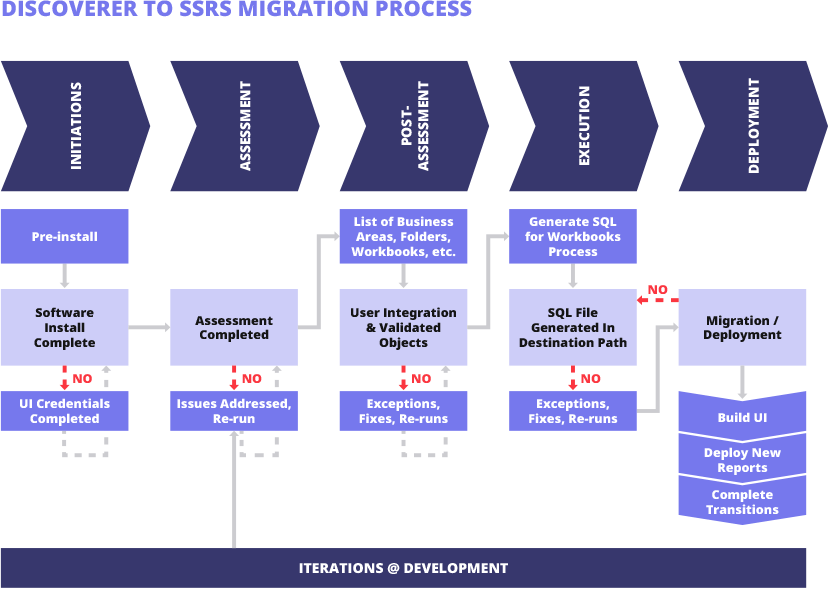
discoverer-to-ssrs-migration-process

Adapting to environment changes: during development, the client found that its SSRS development environment ran on older technology and began upgrading it. To avoid delays, ennVee developed directly in the UAT environment, which also removed the need to promote reports from development to UAT. Discoverer Plus, SQL Developer and the Oracle database connection were verified on every virtual machine used by the team.  

Outcome: Discoverer reports reproduced 1:1 in SSRS

All 408 Discoverer reports were converted to SSRS, with the first 50 business-critical reports live within three weeks. Because every report was validated against its Discoverer output, users moved to the new platform without re-checking their numbers.

With reporting on SSRS, the client's Measurement and Insight team continued to deliver the metrics its customers use to prove event ROI. The team also gained SSRS capabilities such as scheduled delivery and export to multiple formats [confirm which features the client used]. The converted reports support faster business decisions, Oracle production support, enhancement projects and lean initiatives across the client's Oracle ERP.

Example: AP Custom Invoice Payments report

The screenshots below show the same report before and after migration. The SSRS version keeps the Discoverer layout, parameters (GL period and GL account) and row-level output, and adds an operating unit filter.
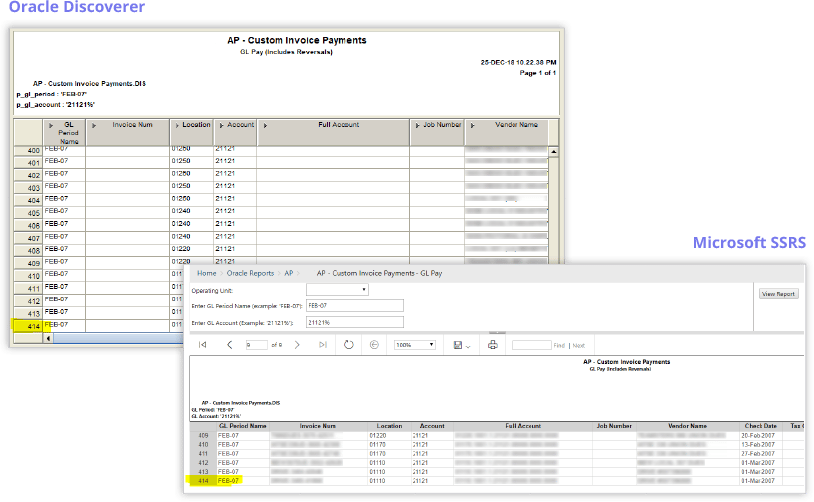
AP-Custom-Invoice

Row 414 matches in both versions, confirming a 1:1 conversion.

2026 update: what has changed for SSRS

When this migration was delivered, SSRS was Microsoft's main on-premises reporting platform and a natural replacement for Oracle Discoverer. That has changed. 

In June 2025, Microsoft announced that it will not release a new version of SSRS with SQL Server 2025. Power BI Report Server (PBIRS) is now the default on-premises reporting solution for SQL Server, and SSRS 2022 is the final SSRS release (Source: Microsoft announcement). 

SSRS is not disappearing overnight. SSRS 2022 remains supported until 11 January 2033, so existing SSRS environments have a long runway. But a new Discoverer migration that targets SSRS would move from one retired tool to another that is being wound down. 

Microsoft has also made the successor easier to adopt. With SQL Server 2025, any customer with a paid SQL Server licence (Standard or Enterprise) can use Power BI Report Server. Previously it was limited to Enterprise edition customers with Software Assurance (Source: Microsoft FAQ).


Already on SSRS? Your reports carry forward

If your organisation followed the same path as this client, your investment still holds. SSRS reports are built as RDL files, and Microsoft states that most RDL reports created in SSRS are fully compatible with Power BI Report Server. Moving from SSRS to PBIRS is therefore an upgrade, not a second rebuild. 

ennVee can assess your SSRS estate, confirm licensing eligibility and the right upgrade path for your SSRS version, and plan the move to Power BI Report Server or to Power BI in the cloud.

Planning a Discoverer migration today? Consider Power BI

For organizations still running Oracle Discoverer, Power BI is a future-proof target:

  • Your Discoverer outputs still have a home. Power BI supports paginated reports, the same fixed-layout, row-level format as the AP Custom Invoice Payments example above. Summary views can become interactive dashboards.
  • Cloud or on-premises, your choice. Power BI Report Server keeps reporting on-premises for organisations that need it, with a clear path to the Power BI service and Microsoft Fabric later.
  • More value from the same data. Reusable data models, self-service analysis and dashboards give business users more than a like-for-like report replacement.
  • The same proven method. The ennSight assessment used in this project, covering reports, SQL, last-run dates and user access, works the same way for a Power BI target. It also identifies unused reports, so you migrate only what the business still needs.

Frequently asked questions


What is a Discoverer to SSRS migration?
It is the process of moving reports from Oracle Discoverer, Oracle's legacy query and reporting tool, to Microsoft SQL Server Reporting Services. It typically involves inventorying Discoverer workbooks, extracting their SQL and business logic, rebuilding them as SSRS reports and validating the output. 
How long does a Discoverer to SSRS migration take?
It depends on the number and complexity of reports. In this project, 50 priority reports were in production within three weeks, and the remaining 358 were converted in four-week sprints. 
Is SSRS still a good target for Discoverer migration in 2026?
SSRS 2022 is supported until 2033, but Microsoft will not release new versions. For new migrations, Power BI Report Server or Power BI in the cloud is the more future-proof choice. 
Can Discoverer reports be migrated to Power BI?
Yes. Detailed Discoverer reports can be rebuilt as Power BI paginated reports, and summary reports can become interactive dashboards. ennSight's automated assessment supports both SSRS and Power BI targets. 
We already migrated from Discoverer to SSRS. Do we need to start again?
No. Most SSRS reports are compatible with Power BI Report Server, so moving from SSRS is usually an upgrade rather than a rebuild. 
What does ennSight do in a Discoverer migration?
ennSight automatically assesses the Discoverer environment and extracts reports, SQL, last-run dates and user access. This shortens discovery and helps retire unused reports before migration.